Free extension for desktop Chrome
Focus Lock
Keep the websites you need.
Choose the sites you need and when to finish. Focus Lock blocks other new web requests in this Chrome profile while you work.
SHA-256 checksum
8cc8eb163807b2135478feb6a0416e4f1f4c3d0b55798f864dd2073bbcf5bc46Unzip the download and select the “Focus Lock” folder under in Chrome.
Install Focus Lock in Chrome
Extract the ZIP
The download contains one folder named Focus Lock. Keep it in the same place after installing.
Select the Focus Lock folder
Open chrome://extensions in Chrome, turn on Developer mode and click . Select the “Focus Lock” folder and confirm.
Pin Focus Lock
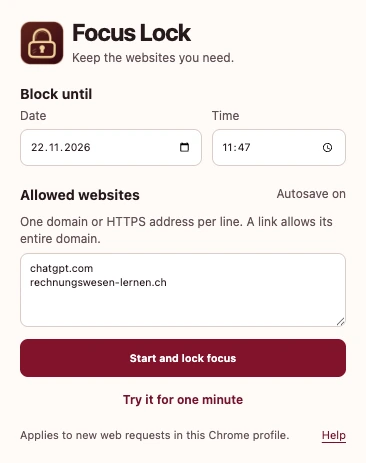
Open Chrome’s puzzle menu and pin Focus Lock. Set the end time, edit the allowed domains and start a session or a one-minute test.
Your settings stay in Chrome
The extension stores allowed domains and the session end time in your local Chrome profile. It uses these settings to apply your website rules and clear them after your session. It does not read page content, collect browsing history, send your settings to a server or use analytics. You can erase its stored data by removing the extension. Focus Lock handles these settings in accordance with the Chrome Web Store User Data Policy, including its Limited Use requirements.
Common questions
Does it work in my usual Chrome tabs?
Yes. The extension filters new web requests in the Chrome profile where it is installed, including embedded requests. Content already loaded or saved in a site’s offline cache may still be visible.
Can I stop early?
There is no stop button during a session. Chrome still lets you turn off or remove extensions. Other profiles, browsers and private windows without Focus Lock remain outside the filter.
What if I close Chrome, or my computer sleeps?
The active rules and end time are saved in Chrome. The extension checks them at browser startup. Chrome may delay the timer alarm while the browser or computer is asleep.
Which addresses should I enter?
Enter one domain or HTTPS link per line. Focus Lock saves valid changes automatically and keeps the domain from each link. Enter subdomains such as www separately. You can edit the list between sessions.
Can I use Moodle and H5P while focusing?
Add your school’s Moodle and H5P addresses on separate lines. Focus Lock includes H5P’s own media servers and supports the Microsoft sign-in used by KV Business School Zurich’s Moodle. A video from an outside provider can require an additional domain.
Can I read my Edubase books during a session?
Add app.edubase.ch. Focus Lock lets the Edubase app fetch the library and book pages from its reader server. Reload the Reader to try again if it still shows the earlier empty library.
Focus Lock for macOS
The native Mac download will be available after Apple signing and installation checks.